How to Calculate Investment Taxes in Ukraine
A step-by-step guide to calculating personal income tax (PIT) and military levy on dividends and stock income for Ukrainian investors trading through Interactive Brokers.
Who this service is for
If you are a Ukrainian tax resident with an account at Interactive Brokers (or another foreign broker), you are required to independently declare and pay taxes on investment income. This applies to:
- dividends from foreign companies;
- profit from selling stocks and ETFs;
- interest on foreign bonds.
Investor Tax automates the routine: downloads your data from IB Flex Report, converts amounts using NBU exchange rates, calculates PIT and military levy, and prepares data for your annual income declaration.
Who must file a declaration
Under the Ukrainian Tax Code, an individual resident is required to file an income declaration (Form F0100215) if during the reporting year they received:
- Dividends from foreign issuers — regardless of amount;
- Income from selling investment assets (stocks, bonds, ETFs) outside Ukraine.
The declaration must be filed by May 1 of the following year (for year X — by May 1, X+1). The final tax payment deadline is August 1.
What taxes must be paid
Dividends from foreign companies
Foreign dividends in Ukraine are taxed at 9% PIT and 5% military levy on the gross dividend amount in hryvnias at the NBU rate on the date of accrual.
Ukraine and the US have a double taxation treaty, and the standard withholding rate for US companies is 10% or 15% (depending on the W-8BEN form). In theory, the withheld foreign tax can be credited against Ukrainian PIT.
Important in practice: The Ukrainian tax authority (DPS) only accepts such a credit if you provide an official document with a wet stamp or apostille from the foreign tax authority (for the US — from the IRS). This document is extremely difficult to obtain in practice. As a result, the vast majority of Ukrainian investors end up paying both taxes: the withholding tax withheld by the broker, plus the full 9% PIT and 5% military levy in Ukraine.
Also important: even if the credit is accepted, it applies only to PIT — the military levy (5%) is always paid in full regardless.
Realistic calculation example for a $100 dividend at NBU rate 41.5 UAH/USD:
- Gross in UAH: 100 × 41.5 = 4,150 UAH
- Withheld by broker (15% for US): 100 × 15% × 41.5 = 622.50 UAH
- PIT 9% (in practice — paid in full): 4,150 × 9% = 373.50 UAH
- Military levy 5%: 4,150 × 5% = 207.50 UAH
- Total payable in Ukraine: 581.00 UAH
Effective tax burden in practice — approximately 29% (15% withholding + 9% PIT + 5% military levy).
Income from selling stocks and ETFs
Investment income (profit from asset sales) is taxed only when a positive financial result is obtained:
- 18% PIT on net profit in hryvnias;
- 5% military levy on net profit in hryvnias.
Profit is calculated as the difference between proceeds from sale and acquisition costs, both converted to hryvnias using NBU rates on the respective dates. If a net loss is incurred for the year — no taxes are due, and the loss is not carried forward to future years.
NBU exchange rates
All foreign currency amounts are converted to hryvnias at the official NBU rate on the transaction date. The service automatically fetches these rates from the National Bank of Ukraine's open API and applies them to each transaction.
FIFO method for stock calculations
The FIFO (First In — First Out) method is used to determine the cost basis of sold shares: the earliest purchased lots are considered sold first.
For example, if you bought a stock three times:
- 10 shares at $100 (01.03.2024)
- 5 shares at $120 (15.06.2024)
- 8 shares at $115 (01.10.2024)
When selling 12 shares in December 2024, FIFO counts: 10 shares at $100 + 2 shares at $120 = $1,040 cost basis.
The service applies FIFO automatically based on trade data from the IB Flex report.
Connecting Interactive Brokers — FlexQuery
IB Flex Web Service is the mechanism for automatic data download from your Interactive Brokers account. To connect:
- Log in to your IB Client Portal.
- Navigate to Reports → Flex Queries → Create.
- For dividends: select Activity → Cash Transactions report with fields: symbol, date, amount, description, currency.
- For stocks: select Activity → Trades report with fields: symbol, open/close dates, prices, quantity, P&L.
- Save the Query ID and generate a token under Reports → Flex Queries → Generate Token.
- Enter the Token and Query ID in the service after registration.
Step-by-step guide
Step 1. Register
Sign up with your email or Google account. After registration, you get free access to dividend calculations and basic features.
Step 2. Load your data
Two ways to load data:
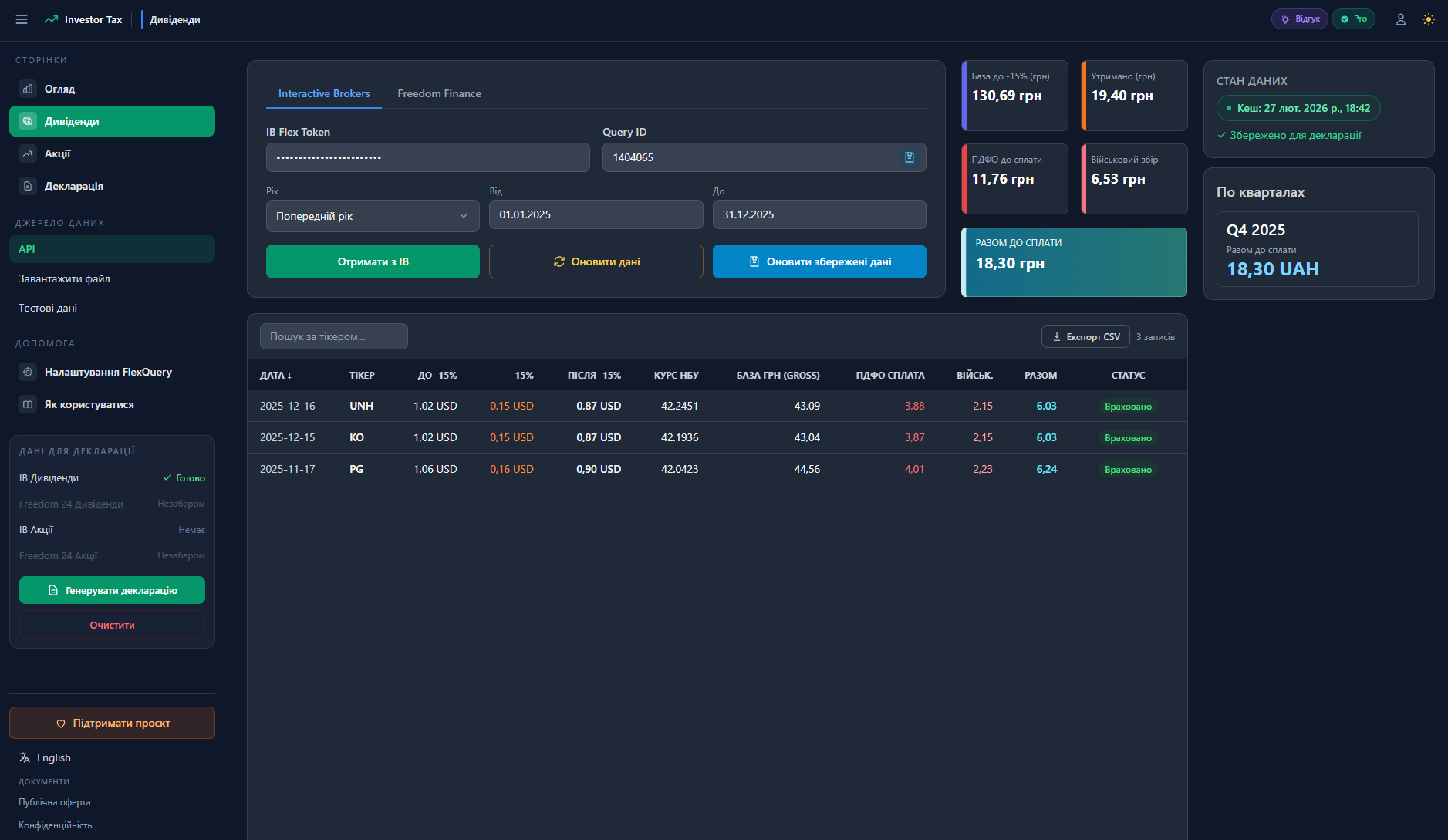
- Automatic via FlexQuery API — enter your Token and Query ID, select the year or custom period, click "Fetch from IB". Data is downloaded directly from your IB account.
- File upload — save the XML or CSV report from IB Client Portal and upload it through the form.
Step 3. Automatic calculation
The service automatically:
- fetches NBU rates for each transaction date;
- calculates PIT and military levy per record;
- groups results by quarter (Q1, Q2, Q3, Q4);
- credits withholding tax for dividends.
Step 4. Review results
View a detailed table per transaction, quarterly breakdown, and total amount due. Export to CSV for manual declaration filing.
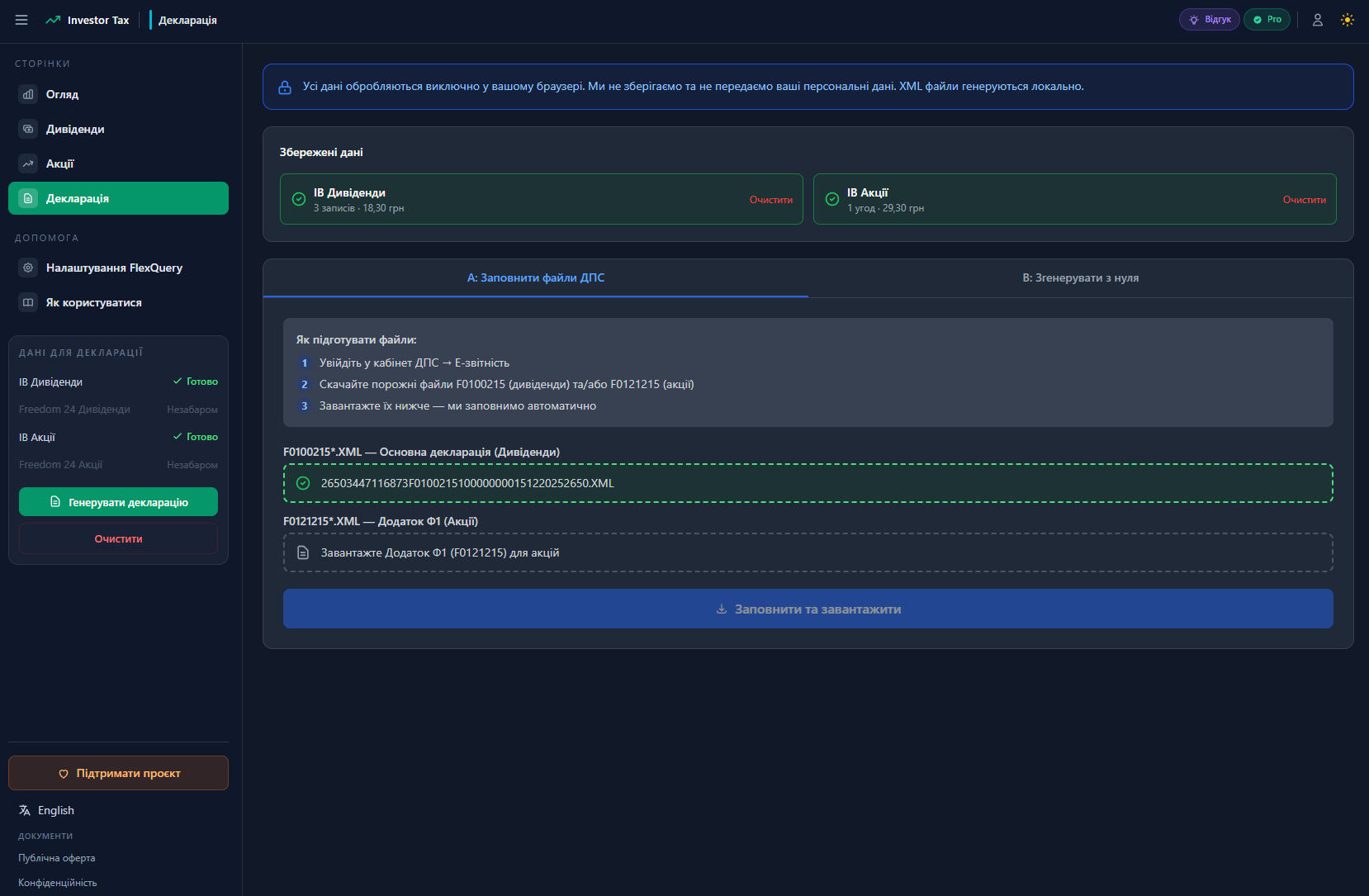
Step 5. Generate XML declaration (Pro)
With Pro, you can:
- Approach A — upload your own declaration XML file (downloaded from DPS) and the service fills in the relevant fields with your data.
- Approach B — the service generates an XML declaration file from scratch with your calculations (you fill in personal data: tax ID, address, DPS office).
The ready XML file can be imported directly into the taxpayer portal at the Ukrainian tax authority (DPS) website.
Data security
Your data security is our priority:
- Financial data is stored locally in your browser (IndexedDB). The server does not store your brokerage data.
- IB Token is not stored on the server — it is used only for the current request.
- HTTPS encryption for all requests between browser and server.
- Operational logs (request facts, errors) are kept only for technical monitoring and contain no financial data.
Pro plan
Basic functionality is free. The Pro plan unlocks:
- XML declaration file generation (approaches A and B);
- Unlimited stock calculations and CSV exports;
- Early access to new features.
Cost: 999 UAH / year.
Payment via Monobank or bank card. Access is activated immediately after payment.
FAQ
Can I use the service if I don't have IB?
Currently the service is optimized for Interactive Brokers (Flex XML/CSV reports). Support for other brokers is in development.
What if I had a loss on stocks?
If your overall financial result from stock sales is negative (a loss), no PIT or military levy is due. The service shows this in the summary table.
How is withholding tax from Interactive Brokers handled?
The service automatically identifies withholding tax entries from the "Withholding Tax" field in the Flex report and credits them against the PIT for the corresponding dividend. The credited amount cannot exceed the calculated PIT amount.
Do I need to file a declaration if I made no profit?
If you received dividends or sold assets during the year — a declaration must be filed regardless of the result. Exception: if your total income from all sources does not exceed a certain limit. We recommend consulting a tax advisor.
Are the NBU rates in the service accurate?
Rates are fetched directly from the official NBU API (bank.gov.ua) and cached for fast access. If a rate is missing for a given date (e.g., a holiday), the previous banking day's rate is used.
Is my financial data stored on the server?
No. Calculation results are stored only in your browser's IndexedDB. Clearing browser data removes all results. The server only stores account information and operational statistics (no financial data).
What is the XML declaration file for DPS?
It is a machine-readable XML file accepted by the Ukrainian tax authority (DPS) portal for electronic income declaration submission. The file can be downloaded from your personal account at cabinet.tax.gov.ua, filled in via our service, and uploaded back.